
Reviews
Description
Core Objective and Controls
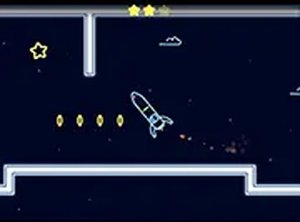
Neon Rocket Precision Flight asks you to guide a rocket through a series of barriers without touching them. The rocket moves forward automatically, and your job is to adjust its vertical position using simple controls. On mobile, you tap or touch the screen; on desktop, you use the mouse or keyboard. The challenge lies in reacting quickly to obstacles that appear in different shapes and sizes. A single collision ends the run, so every input matters.
Obstacle Design and Star Collection
Obstacles are not uniform. They vary in shape and size, which forces you to read the path ahead and make split-second adjustments. Some gaps may require precise timing, while others demand a steady hand. Scattered along the route are shiny stars. Grabbing them boosts your score, but chasing stars can pull you into dangerous positions. The tension between collecting and surviving is central to the game's difficulty.
Visual Style and Platform Availability
The game uses a neon aesthetic with bright colors against dark backgrounds. This high-contrast look makes obstacles and stars easy to spot, which matters when every pixel counts. Neon Rocket Precision Flight runs directly in a browser on both mobile devices and desktop computers. No downloads or installations are needed, so you can start a run whenever you have a few minutes.
Who It Suits and How to Improve
This is a game for players who enjoy quick reflex challenges and score chasing. It is easy to learn but hard to master, as the later obstacles demand sharper timing. To improve, focus on looking ahead rather than at the rocket itself. Practice smooth, small adjustments instead of jerky movements. Collect stars only when the path is clear. Regular short sessions help build the coordination needed for higher scores.
Compatibility
Faq
Player Comments
Sign in to comment
You must be logged in before posting a review or rating.
No comments yet. Be the first to comment!




Editorial Notes